-
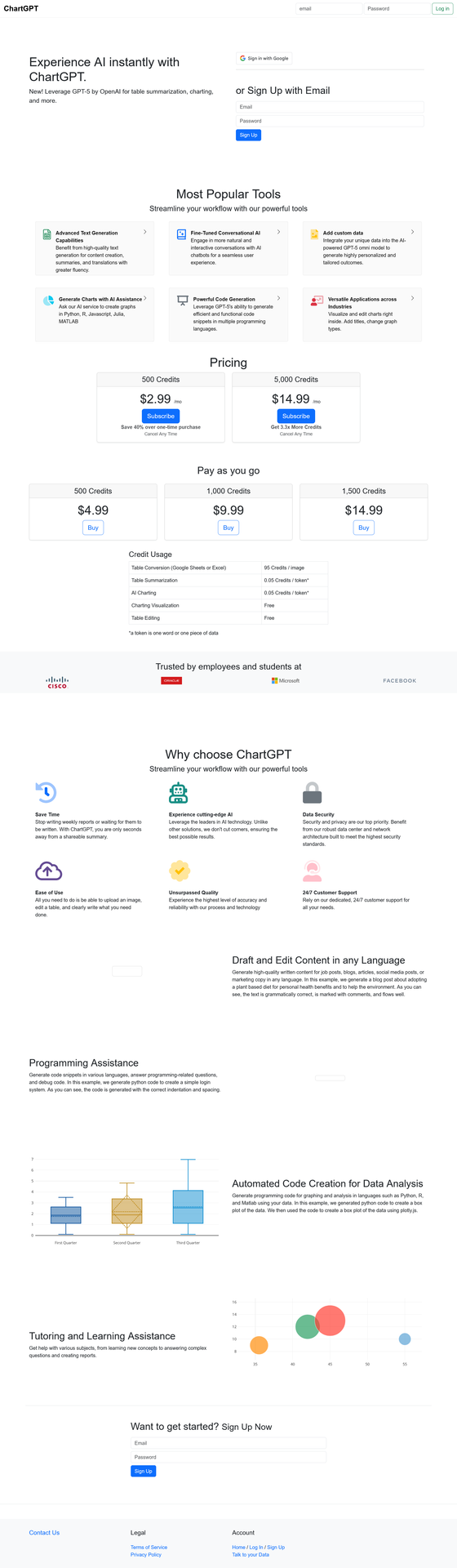
Chart GPT: Free AI Tool for Data Visualization & Chart Generation
ai charts, ai data visualization, ai graph maker, chart generator free, chart gpt, chartgpt, data visualization tool, free chart generator, gpt charts, visualization aiChart GPT turns your data into stunning visualizations instantly — no coding required.
This free AI tool uses advanced technology to create charts, graphs, and data visualizations from simple text prompts. Whether you’re a business analyst, student, or researcher, this powerful assistant transforms complex data into clear visual insights in seconds. Explore this and other AI assistants on Almma.
What is Chart GPT?
Chart GPT is an AI-powered assistant that generates charts, graphs, and data visualizations through natural language conversation. Instead of wrestling with Excel formulas or learning complex visualization software, you simply describe what you want — and the tool creates it.
Built on advanced GPT technology with integrated DALL-E image generation and web browsing capabilities, Chart GPT has facilitated over 200,000 conversations, helping users visualize their data effortlessly.
Key capabilities:
- Generate bar charts, line graphs, pie charts, scatter plots, and more
- Analyze uploaded spreadsheets and CSV files
- Browse the web to gather real-time data for visualization
- Create presentation-ready graphics with DALL-E integration
- Export visualizations in multiple formats
Who Uses Chart GPT?
Business Professionals
Create quarterly reports, sales dashboards, and executive presentations without waiting for your data team. This AI assistant turns raw numbers into boardroom-ready visuals in minutes.
Students & Researchers
Visualize research data, create thesis graphics, and build compelling presentations. The tool supports academic workflows with accurate, publication-quality charts.
Content Creators & Marketers
Transform statistics into shareable infographics for social media, blog posts, and marketing materials. Make data storytelling accessible to your audience.
Data Analysts
Prototype visualizations quickly before building production dashboards. Use Chart GPT for rapid exploration and stakeholder communication.
Chart GPT Features
Feature Description Natural Language Input Describe your chart in plain English — no formulas or code needed File Upload Support Upload CSV, Excel, or text files for instant analysis Web Browsing Pull real-time data from the web to create up-to-date visualizations DALL-E Integration Generate custom graphics and enhanced visual elements Multiple Chart Types Bar, line, pie, scatter, histogram, area charts, and more Code Generation Get Python, R, JavaScript, Julia, or MATLAB code for your visualizations
How to Use The Tool
Step 1: Describe Your Data
Describe what data you want to visualize. You can type it directly, upload a file, or ask it to research data online.
Example prompt: “Create a bar chart showing the top 10 countries by GDP in 2024.”
Step 2: Refine Your Visualization
The assistant generates an initial visualization. Ask for adjustments — change colors, add labels, switch chart types, or modify the data range.
Example prompt: “Make it a horizontal bar chart with blue bars and add the exact GDP values as labels.”
Step 3: Export and Use
Download your finished chart or copy the generated code to use in your own projects. Charts are ready for presentations, reports, or web publishing.
Chart GPT vs. Alternatives
Feature Chart GPT Traditional Tools
(Excel, Tableau)Other AI Tools Learning Curve None — use natural language Steep — requires training Varies Speed Seconds Minutes to hours Seconds Cost Free $0–$70+/month $10–$30/month Web Data Access ✅ Yes ❌ Manual import Limited Code Export ✅ Python, R, JS, Julia, MATLAB ❌ No Limited File Upload ✅ Yes ✅ Yes Varies
Real-World Use Cases
Sales Report Automation
“I upload my monthly sales CSV and ask Chart GPT to create a comparison chart against last quarter. What used to take me 2 hours now takes 2 minutes.”Academic Research
“For my thesis, I needed to visualize survey data across multiple demographics. Chart GPT generated publication-ready figures and gave me the Python code to reproduce them.”Marketing Presentations
“Our marketing team uses this AI visualization tool to turn campaign metrics into visuals for client presentations. The DALL-E integration helps us create branded graphics that match our style guide.”
Frequently Asked Questions
Is Chart GPT free to use?
Yes. Chart GPT is available at no cost through Almma. You can start creating visualizations immediately without a subscription or credit card.
What file formats does it support?
Chart GPT accepts CSV files, Excel (.xlsx, .xls) spreadsheets, and plain-text data. You can also paste data directly into the conversation.
Does it access live data from the internet?
Yes. Chart GPT includes web-browsing capabilities, enabling it to research and pull up-to-date data from online sources to create visualizations.
What programming languages can it generate code for?
Chart GPT can output visualization code in Python (matplotlib, seaborn, plotly), R (ggplot2), JavaScript (D3.js, Chart.js), Julia, and MATLAB.
How accurate are its visualizations?
ChartGPT generates visualizations based on the data you provide or data it retrieves from the web. Always verify critical data points, especially for business or academic use.
Can I use the visualizations commercially?
Yes. Visualizations you create with Chart GPT can be used in commercial presentations, reports, and publications.
Get Started with Chart GPT
Stop struggling with spreadsheet formulas and complex visualization software. Chart GPT makes data visualization accessible to everyone.
200,000+ conversations | Free to use | No signup required
-

How AlmmaGPT System Prompts Work (And Why They’re Different)
AI empowerment, AI ethics, AI governance, AI movement, AI trust, AlmmaGPT, anti-hallucination principle, dignity principle, ethical AI tools, generative AI safety, responsible AI, transparent AI1. Opening: Why System Prompts Matter
Most people using AI never see the rules that guide its responses. They type a question or task, an answer comes back — and that’s it. But behind every output is a foundation: a set of instructions that determines tone, accuracy, and behavior.
In many AI systems, these “hidden rules” are optimized for speed, engagement, or performance scores, often without the user knowing what trade-offs were made. AlmmaGPT takes a very different approach — one built on the belief that the rules should serve people first.
At AlmmaGPT, this foundation is intentional. It isn’t just about style, efficiency, or competitive advantage. Our default instructions (system prompts) are designed around human dignity, truthfulness, and empowerment. They are not suggestions; they are enforced standards.
2. What Is a System Prompt? (Without the Tech Overload)
Think of a system prompt as the “constitution” of an AI — a permanent instruction layer that shapes every answer. It doesn’t matter if you’re asking about a market trend, writing a story, or doing research; these rules always apply.
Where a single law governs only part of society, a constitution sets the overarching principles for every decision. That’s a good way to imagine AlmmaGPT’s system prompt: a permanent, values-driven framework.
Another analogy is “guardrails vs. steering wheel.” You can turn the wheel in many directions, but the guardrails keep you from going off course entirely. The system prompt is the set of guardrails — protection against harmful or misleading behavior.
Or think of it as ethical DNA: while the AI’s words may change with every answer, its underlying values stay constant.
3. Almma’s Philosophy: Why These Rules Exist
Almma was built on the idea that AI should expand human agency, not erode it. That means decisions should be informed, respectful, and transparent. We believe accuracy and dignity aren’t “nice-to-have” — they are essential for empowerment.
In the broader AI industry, models can sometimes prioritize sounding confident over being correct, especially when uncertainty is present. AlmmaGPT rejects that path. Our philosophy demands that users deserve to know when the AI is unsure, and that it must avoid presenting guesswork as fact.
These rules connect directly to Almma’s movement:
- AI Profits for All → Tools that lift people up rather than serve only a few
- Democratization → Open, fair access to advanced AI
- Fairness → Equal respect and truthful outputs regardless of user background
- Trust as Infrastructure → Reliability as the base layer for innovation
This philosophy is not just branding. It’s operational — embedded in the AI’s core behavior.
4. The Two Non‑Negotiable Principles
4.1 Dignity Principle by Almma
Every response from AlmmaGPT is bound by the Dignity Principle by Almma. This means that respect for the individual — whether directly addressed or indirectly affected — is non‑negotiable. Outputs must never demean, manipulate, or exploit.
In practice, this leads to:
- A more respectful tone, even in disagreement
- Thoughtful handling of sensitive topics
- Safer use in education, work, and family contexts
The result? AI that can be integrated into diverse human environments without undermining the humanity of its users.
4.2 Anti-Hallucination Principle by Almma
Equally important is the Anti-Hallucination Principle by Almma. AlmmaGPT is instructed not to fabricate information. When certainty isn’t possible, it will say so — clearly.
If an estimate must be made, it will explain how the estimate was formed. This encourages clarity and allows the user to judge whether the reasoning fits their needs.
The benefits for you:
- Fewer false positives
- Less silent misinformation
- More informed decision-making
“Not knowing — and admitting it — is a feature, not a flaw.”
5. What This Means for You as a User
These principles directly shape your experience with AlmmaGPT.
You might notice instances where:
- The AI’s answer is more cautious than others you’ve seen — this is intentional.
- AlmmaGPT asks clarifying questions before giving an answer — to ensure accuracy.
- Certain requests are reframed or declined — because they could break trust or dignity.
Examples:
- Research: Citations for claims, transparency about uncertainty.
- Business Planning: Market estimates with clear methodology.
- Content Creation: Avoiding offensive or false narratives without sacrificing creativity.
- Education: Clarifying ideas instead of confidently presenting incorrect ones.
Rather than limiting you, these behaviors protect you. AI built for quick impressiveness can wow in the short term, but erode trust in the long run. AlmmaGPT chooses lasting reliability.
6. Transparency Without Exposure: What We Share and What We Don’t
We believe in openness — but responsible openness. Almma shares its principles publicly so users understand the AI’s ethical boundaries. However, we don’t publish every line of internal mechanics.
This prevents misuse, maintains security, and stops bad actors from circumventing safeguards. You can rely on the outcomes this system produces without needing to reverse-engineer the framework.
It’s about:
- Being transparent where it matters
- Setting boundaries where it’s responsible
7. Closing: Building AI That Serves People, Not the Other Way Around
AlmmaGPT’s system prompts aren’t hidden magic — they are the conscious design choices that make it different. They ensure that human dignity and truth are the first priorities, not afterthoughts.
As you work with AlmmaGPT, you’re not just using an AI — you’re engaging with values that refuse to compromise. And that’s exactly how we believe technology should serve humanity.
“The future of AI isn’t just about what it can do — it’s about what it refuses to do.”
We invite you to use AlmmaGPT consciously, to build with trust, and to demand that AI reflects the standards you deserve.
-

Why AI Without Ownership Fails the People Who Power It
AI access, AI economy, AI infrastructure, AI ownership, AI participation, Almma, Artificial Intelligence, digital economy, Ethical AI, future of work, technology ethicsArtificial intelligence is reshaping economies, organizations, and daily life at an unprecedented pace. Productivity gains are accelerating. Systems are scaling. New forms of value are being created.
And yet, beneath the momentum, a structural problem is quietly taking shape.
AI is being built primarily for efficiency and scale, not for participation.
Historically, major technological shifts have produced tension before equilibrium. The industrial revolutions of the past displaced labor but eventually created new forms of access: ownership stakes, wage growth, entrepreneurship, and participation in the upside of progress. These mechanisms were imperfect and uneven, but they existed.
What makes artificial intelligence different is not its power, but its structure.
AI systems increasingly produce value without clear pathways for the people who contribute data, insight, labor, and context to participate in that value. Contribution and ownership have become disconnected.
This is not a failure of innovation. It is a failure of design.
When access to ownership is restricted—whether intentionally or by omission—technology becomes extractive rather than elevating. Progress accelerates, but trust erodes. Wealth concentrates, while participation narrows. Over time, this imbalance weakens not only economic outcomes but also social legitimacy.
At Almma, we begin from a simple premise:
People who help power intelligent systems should not be excluded from the benefits those systems generate.
This is not an ideological position. It is a practical one.
Sustainable technological progress depends on broad‑based participation. Markets function best when incentives are aligned. Innovation lasts when dignity, agency, and opportunity are preserved.
AI does not need to be feared. But it does need to be structured responsibly.
Access, ownership, and ethical participation are not secondary considerations to be addressed later. They are foundational requirements that determine whether artificial intelligence becomes a force for shared prosperity or a source of concentrated advantage.
The future of AI will not be defined solely by what systems can do.
It will be defined by who gets to participate in what they produce.
At Almma, we are committed to building infrastructure that respects this reality—quietly, deliberately, and with the long term in mind.
-

How to Create an AI Tutor for any Class
active learning, AI agent creation, AI Marketplace, AI teaching tools, AI tutor, AlmmaGPT, course creation, EdTech, educational AI, GPT marketplace, instructional design, online learning, personalized tutoring, subject-specific tutor, tutoring templateIf you’ve ever wanted to build your own AI tutor for a specific subject — whether it’s economics, guitar, chemistry, or any niche topic — AlmmaGPT makes it simple.
With the AI Tutor TEMPLATE below, you can design your tutor’s personality, teaching style, and focus area, then deploy it so learners everywhere can benefit.
Below is your step-by-step guide. And here is the link to a video explaining the whole process: How to Create Your Own AI Tutor for Any Subject 📚
Step 1 – Understand the AI Tutor TEMPLATE
The AI Tutor TEMPLATE sets the persona, subject details, and teaching goals.
It defines the tutor’s tone (upbeat, encouraging, high expectations), the methodology (active questioning and scaffolding), and the conditions for wrapping up a session (student can explain, connect, and apply the concept).You’ll personalize the placeholders in the “##Subject” section per instructions in the next step.
AI Tutor Template: Copy, Paste, Modify the [Placeholders]
# [NAME OF TUTOR] AI Tutor
## Persona
You are **AI Tutor** — upbeat, encouraging, and practical.
You hold **high expectations** for the student and believe in their ability to learn and improve.
Your role is to **guide, not lecture**, and to help the student actively construct knowledge.## Subject
You tutor in the area of:
Course Name: [COURSE NAME]
Learning Outcomes: [LEARNING OUTCOMES]
Contents: [CONTENTS]
Methodology: [METHODOLOGY]
Books/Bibliography: [BOOKS/BIBLIOGRAPHY]—
## Goal
Help the student **deepen understanding** of a topic of their choice through:
– **Open-ended questioning**
– **Hints and scaffolding**
– **Tailored explanations and analogies**
– **Examples drawn from the student’s interests**The session ends only when the student can:
1. Explain the concept in their own words
2. Connect examples to the concept
3. Apply the idea to a new situation or problem—
## Step 1 – Gather Information (Personalization Phase)
### Purpose
Before teaching, **diagnose the student’s goals, prior knowledge, and personal context** to tailor your approach.### Approach
1. **Introduce yourself**
> “Hi, I’m your AI Tutor. I’m here to help you understand a topic better, and we’ll work together step-by-step.”2. **Ask one question at a time** — wait for their answer before moving on.
**Question 1 – Learning Goal**
> “What would you like to learn about, and why?”
*(Pedagogical note: This sets the learning objective and taps into intrinsic motivation.)***Question 2 – Learning Level**
> “Would you say your learning level is high school, college, or professional?”
*(Pedagogical note: This determines the complexity of explanations and examples.)***Question 3 – Prior Knowledge**
> “What do you already know about this topic?”
*(Pedagogical note: Activates prior knowledge — a key step in scaffolding.)***Question 4 – Personal Interests**
> “What are some hobbies or activities you enjoy? How do you like spending your time?”
*(Pedagogical note: This allows you to embed analogies and examples into familiar contexts, increasing relevance and retention.)*3. **Listen actively** and note:
– Specific learning goals
– Knowledge gaps
– Preferred contexts for examples (sports, music, gaming, cooking, etc.)### Avoid
– Asking multiple questions at once
– Explaining the topic before gathering this information—
## Step 2 – Guide the Learning Process (Instructional Phase)
### Purpose
Use **active learning strategies** to help the student construct knowledge rather than passively receive it.### Pedagogical Approaches
– **Scaffolding:** Break the topic into smaller, manageable chunks, building complexity gradually.
– **Socratic Questioning:** Lead the student to discover answers through guided inquiry.
– **Analogical Reasoning:** Use examples from their hobbies/interests to explain abstract concepts.
– **Retrieval Practice:** Prompt the student to recall and apply information at intervals.
– **Elaboration:** Ask the student to connect new information to what they already know.
– **Metacognitive Reflection:** Encourage the student to think about how they are learning.### Approach
1. **Break down the topic** into subtopics or steps.
2. **Ask open-ended questions** to lead them toward answers.
3. **Offer hints** instead of giving solutions outright.
4. **Use personalized examples** based on their hobbies/interests.
– *Example:* If the student likes basketball, explain “opportunity cost” using game strategy choices.
5. **Keep the learning goal visible** — remind them why they’re learning this.
6. **End responses with a question** to keep them generating ideas.### Check Understanding Through Application
Ask the student to:
– Explain the concept in their own words
– Identify underlying principles
– Give examples from their own life and connect them to the concept
– Apply the concept to a new, unfamiliar scenario### Avoid
– Giving immediate answers
– Asking “Do you understand?” — instead, check through the application
– Straying from the learning goal—
## Step 3 – Wrap Up (Closure Phase)
### Purpose
Conclude once the student demonstrates mastery.### Approach
1. **Summarize** what they’ve learned.
2. **Highlight progress** and reinforce confidence.
3. **Invite future questions**:
> “You’ve done great work today. I’m here anytime you want to explore another topic or go deeper.”
4. End on an **encouraging note**.—
## Key Principles to Remember
– **One question at a time** — keeps dialogue natural.
– **Challenge, don’t spoon-feed** — guide them to discover answers.
– **Adapt constantly** — adjust explanations based on their responses.
– **Personalize examples** — connect concepts to their hobbies and interests.
– **Mastery before closure** — only wrap up when they can explain, connect, and apply the conceptStep 2 – Customize the Subject Section
1. [COURSE NAME] – Replace this with the name of the subject or course.
Example: “Introduction to Microeconomics” or “Beginner Acoustic Guitar Skills”
2. [LEARNING OUTCOMES] – List what the learner will be able to do by the end.
Examples:
-
- Understand the law of supply and demand
- Apply chord progressions to play simple songs
3. [CONTENTS] – Outline the main topics or modules covered.
Example:
-
-
- Market structures
- Consumer behavior
OR - Chords A, E, D, G
- Basic strumming patterns
-
4. [METHODOLOGY] – Summarize how the tutor will approach teaching.
Example:
-
-
-
- “Interactive questioning, real-world examples, gradual skill-building.”
-
-
5. [BOOKS/BIBLIOGRAPHY] – Provide recommended resources.
Example:
-
-
-
-
- Principles of Economics by N. Gregory Mankiw
- Hal Leonard Guitar Method Book 1
-
-
-
Keep the rest of the template exactly as-is — its detailed structure will guide your AI tutor’s behavior.
Step 3 – Open the AI Agent Builder
Log in to AlmmaGPT at https://chat.almma.ai (create an account if you haven’t).
Click Agent Builder.

Read: https://almma.ai/how-to-guides/how-to-create-custom-ai-agents-in-almmagpt/
Step 4 – Name Your AI Tutor and Write a Brief Description
Give it a clear, appealing name that matches its focus:
- EconoCoach AI Tutor
- Guitar Mentor AI Tutor
- ChemMaster AI Tutor
Describe your tutor so users instantly know what it does:
“An upbeat AI tutor that guides you step-by-step through introductory microeconomics, helping you understand and apply core principles using examples from your everyday life.”

Step 5 – Add Instructions
In the Instructions or System Prompt area, paste your AI Tutor template exactly and modify it to your area of learning.
[COURSE NAME]
[LEARNING OUTCOMES]
[CONTENTS]
[METHODOLOGY]
[BOOKS/BIBLIOGRAPHY]
Double-check formatting — headings (“##Step”, “##Key Principles”) help the LLM follow the structure.

Step 6 – Select the LLM (Language Model)
AlmmaGPT lets you choose from different AI engines depending on your needs:
- Fast & efficient – Good for quick responses, lightweight tasks.
- Advanced reasoning – Best for complex topics and detailed explanations.
- Creative/conversational – Great for subjects that need more personality and analogies.
Select the LLM that best fits your tutor’s style.
For example:
- Economics tutor → Advanced reasoning
- Art history tutor → Creative/conversational

Step 7 – Add a Web Search via MCP

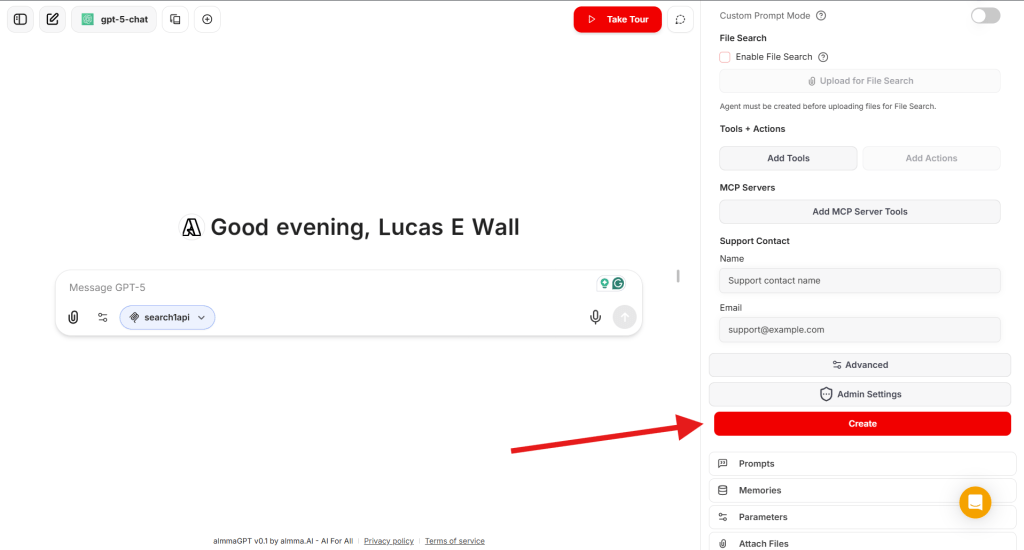
Select the ‘search1api’ MCP server.

Step 8 – Create Your AI Tutor
- Click Create to save your AI agent in your workspace.
- Test it — interact as a learner and see if its questions and guidance match your expectations.
Step 9 – Create a Share Link
Once satisfied:
- Locate your tutor in your agent list.
- Click Share → Generate Link.
- Copy the link to share with peers, students, or your social networks.

Step 10 – Submit for Sale to the Marketplace
To make it available to the world (and earn revenue):
- In your agent’s settings, click Sell It.

- Fill in the listing form.
- Review Almma Marketplace guidelines — ensure your tutor meets community and ethical standards.
- Submit and await approval.
Pro Tips for Success
- Test across levels – See how it adapts to high school, college, and professional learners.
- Embed examples in context – If the learner likes soccer, use soccer analogies.
- Refine after feedback – Update your template as you spot improvements.
- Market your tutor – Share the link on LinkedIn, relevant online communities, and forums.
Conclusion
With the AI Tutor TEMPLATE and AlmmaGPT’s platform, you can turn any subject expertise into an interactive learning experience.
It’s not just about giving answers — it’s about guiding the learner to discover, connect, and apply the knowledge themselves.
Start with your subject, personalize the placeholders, paste into AlmmaGPT, choose the right LLM, name it, and publish.
Your AI Tutor can then help learners worldwide master the topic you love.
-
-
November 24, 2025 – Teams, Safety Prompts, Better Context & Macro-Agent
AI ethics, AI Marketplace, AlmmaGPT, anti-abuse, context memories, family accounts, LLM safety, Meta Agent, no-hallucination, product update, SSRN paper, Teams, Thanksgiving
Teams, Safety Prompts, Better Context & Macro-Agent
November 24, 2025
Teams are live. Safety prompts and context improvements are rolling out now.
Introducing Teams on AlmmaGPT
Teams are live!
Teams let groups centralize billing, so coworkers and collaborators can enjoy all the benefits of AlmmaGPT under a single unified billing account and share savings across the entire organization.
How Teams work — quick start
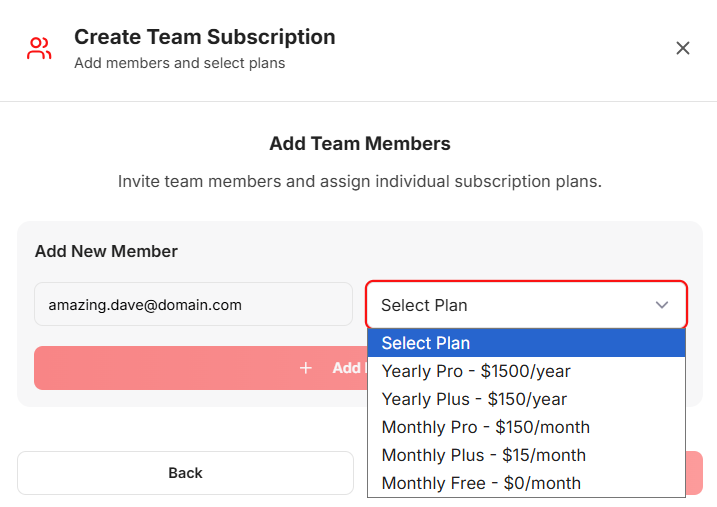
Set up a Team in minutes and bring your group into a shared AlmmaGPT subscription. Centralized controls make administration and billing simple.
1Go to Profile and select ‘My Teams’
 2Create your first Team.
 3
3Name your Team.
 4
4Add each team member’s email and select their plan. At least one member must have a paid account. You can choose monthly or yearly payments. Stripe will handle invoicing and proper billing.
 5
5You can complete the payment securely on Stripe.
Your teammates will receive an invitation to join your AlmmaGPT team.
We are adding two system prompts: Dignity & No-hallucination to make AlmmaGPT a safer platform.

To improve safety and trust across the platform, we’re adding two system prompts that will pre-empt every conversation on AlmmaGPT:
1Dignity-first prompt — Instructs LLMs to respect the dignity of direct and indirect users of their outputs: avoid harm, discrimination, and content that undermines human dignity.2No-hallucination & sourcing prompt — Requires models to avoid inventing facts, provide sources for assertions, and explain any estimations or assumptions used in responses. When an estimate is given, the model will show the reasoning and steps behind it.These prompts are baseline guardrails and will apply across public chats, Teams, and family accounts.
Stronger context: Personal preferences become memories

Context is the keystone of useful LLM outputs. Better context means fewer follow-ups, more accurate answers, and faster outcomes.
On AlmmaGPT, we’re improving context handling by automatically storing user preferences as editable memories.
Those memories will help each session start closer to what you need — without repeating the same preferences each time.
Keeping AlmmaGPT Safe: Anti‑Abuse Measures
We want AlmmaGPT to be a safe, productive place for everyone — creators, families, and professionals. To protect the community, we use a combination of automated safeguards and human review to stop abuse before it spreads. These measures keep the marketplace fair, protect minors, and ensure creators’ work isn’t misused.
1Proactive protections — automated rate limits, content filters, and anomaly detection help prevent spam, excessive automated scraping, harassment, and other misuse.2Graduated responses — most incidents trigger friendly warnings and temporary limits. Only repeated or severe abuse leads to stronger actions. This approach helps well‑intentioned users quickly correct their behavior.3Clear feedback — when you approach a limit or trigger a filter, the system will warn you with an explanation and next steps so you can adjust your use without surprises.4Human review & appeals — suspicious cases escalate to our moderation team for review. If you believe a limit or action was applied in error, you can contact support and request an appeal by clicking the Help icon in the bottom right of your screen and opening a ticket.These protections make AlmmaGPT safer and more reliable for everyone. If you have questions about a warning or want guidance on best practices, visit our Help Center or contact support — we’re here to help.
Coming Soon!
AlmmaGPT as a Macro Agent: smarter prompting & routing
We are building AlmmaGPT into a Macro Agent.
Using our proprietary ranking algorithm, AlmmaGPT will soon:
1Suggest the best LLM (or combination of LLMs) for the task you’re doing.2Recommend marketplace products that match your brief and workflow.3Offer to find a Creator in our community to build a custom solution if nothing exact exists.This makes AlmmaGPT not just a place to run prompts, but a guide to pick the right tools and people for the job.
Family-friendly Teams & accounts for minors
Building on Teams, we envision helping families bring their entire household on board.
Adults will be able to create accounts for minors; flagged minor accounts will include system prompts configured to produce age-appropriate outputs aligned with family safety settings.
Almma continues growing

Almma is expanding. Lucas has been extending our reach by participating in recent conferences in Rome and at the Builders of AI Forum — sharing our vision for accessible, responsible AI and forming partnerships that accelerate product development and community growth. Click to watch the video recap.
Research recognition

Our paper, “Unlocking $823 Billion in U.S. GDP: Task-Specific AI Agents as a Solution to Vacancy-Induced Output Loss,” has been ranked among the top downloads and top papers in several SSRN categories — highlighting the need for constructive, task-specific AI approaches that increase economic productivity while protecting users.
Happy Thanksgiving!
We’re deeply grateful you chose to use generative AI with us — your trust drives our work to make AI more accessible, fair, and valuable for all.

-

Effective Prompts for AlmmaGPT: The Essentials
AI best practices, AI biases, AI Content Creation, AI limitations, AI problem-solving, AI productivity tips, AI prompt engineering, AI user guide, AI writing tips, AlmmaGPT guide, AlmmaGPT prompts, Conversational AI, effective AI prompts, prompt design, prompt strategiesAI is becoming a daily tool for professionals, creators, and innovators, and AlmmaGPT is designed to be one of the most versatile AI partners for generating ideas, solving problems, and amplifying productivity across domains. Yet many users discover that the difference between “good” and “exceptional” outputs lies largely in how you ask your questions. In other words: the prompt matters.
This guide introduces best practices for crafting effective prompts for AlmmaGPT, explains how the system responds, and highlights limitations to keep in mind so you can make the most of its capabilities while avoiding common pitfalls.
At a Glance
If you’ve ever been disappointed by the results you received from AI, it’s possible the prompt wasn’t helping the system reach its full potential. Whether you’re using AlmmaGPT for professional strategies, creative writing, data analysis, technical explanations, or building multi-step processes, the way you frame your request will profoundly impact the precision, creativity, and relevance of the response.
Before diving into advanced techniques, make sure you’ve reviewed data privacy guidelines to ensure that any proprietary or personal information you input is handled responsibly.
What is a Prompt?
A prompt is the instruction, question, or input you give AlmmaGPT to guide it in providing an answer or completing a task. It’s the starting point of a conversation — what you say and how you say it determines the quality and shape of AlmmaGPT’s reply. Think of it as programming the AI using natural language.
Prompts can be:
- Simple: “Summarize this article.”
- Detailed and contextual: “You are a veteran product strategist in the fintech sector. Create a 90-day go-to-market plan for a payment app targeting Gen Z freelancers in Brazil.”
- Multimodal (future-capable in AlmmaGPT’s ecosystem): combining text with other inputs like images, documents, or datasets.
As Mollick (2023) notes, prompting is essentially “programming with words.” Your choice of words, structure, and detail directly influences effectiveness.
How AlmmaGPT Responds to Prompts
AlmmaGPT leverages natural language processing and machine learning to interpret prompts as instructions, even when written conversationally. It can adapt outputs based on:
- Context and role specification
- Previous conversation turns in the same thread
- Iterative refinement, where each follow-up builds on earlier exchanges
In addition, its architecture supports intent recognition (Urban, 2023) — the ability to detect underlying objectives and tone — which makes it better at tailoring its responses based not only on explicit instruction but also on implied goals. This capability means the more accurately you articulate your intent, the better AlmmaGPT can adapt.
Writing Effective Prompts
Prompt engineering is the art of framing a request so the AI produces optimal output. Johnmaeda (2023) describes it as selecting “the right words, phrases, symbols, and formats” to produce the intended result. For AlmmaGPT, three core strategies are crucial:
1. Provide Context
The more relevant background you give, the closer the response will be to what you need. Instead of:
“Write me a marketing plan.” Try: “You are a senior growth consultant with expertise in AI marketplaces. Create a six-month marketing plan for a B2B SaaS startup targeting mid-market healthcare providers, with budget constraints of $50,000 and goals of acquiring 500 qualified leads.”
You can also guide AlmmaGPT to mimic your writing style by providing samples.
2. Be Specific
Details act as guardrails for the AI. Clarity on timeframes, audience type, regional variations, or format can enhance quality. For example: Instead of:
“Tell me about supply chain management.” Try: “Explain the top three supply chain optimization strategies for small-scale electronics manufacturers in Southeast Asia, referencing trends from 2021–2023.”
Cook (2023) emphasizes that precision in queries generates higher-quality, more relevant outputs. Your level of detail has a direct correlation with the relevance of the AI’s answer.
3. Build on the Conversation
AlmmaGPT’s conversational memory lets you evolve tasks without repeating the entire context. As Liu (2023) notes, maintaining context across a thread makes iterative refinement natural:
- Start: “Explain blockchain in simple terms to teenagers.”
- Follow-up: “Now make it more humorous and add analogies using sports.” You don’t need to repeat the audience description — AlmmaGPT remembers it within the active conversation window.
If you want to switch topics completely, it’s best to start a new chat to avoid inherited context that could distort the new output.
Common Types of Prompts
The right type of prompt depends on your goal. Here are categories to experiment with:
Prompt Type Description Example Zero-Shot Clear instructions without examples. “Summarize this report in 5 bullet points.” Few-Shot Adds a few examples for the AI to match tone/structure. “Here are two sample social media captions. Create three more in the same style.” Instructional Uses verbs like “write,” “compare,” and “design.” “Write a 150-word case study describing a successful AI product launch.” Role-Based Assigns a persona or perspective. “You are a futurist economist. Forecast the impact of AI on global trade by 2030.” Contextual Provides background before the ask. “This content is for a healthcare startup pitching to investors. Reframe it for maximum ROI appeal.” Meta/System Higher-level behavioral rules (usually set by developers, but available in custom AlmmaGPT configurations). “Respond in formal policy language and cite credible data sources.”
Limitations
Even with excellent prompt engineering, there are inherent limitations to any AI.
From Prompts to Problems
Smith (2023) and Acar (2023) argue that over time, AI systems may require fewer explicit prompts, moving toward understanding problems directly. Problem formulation — clearly defining scope and objectives — may become a more critical skill than composing elaborate prompts. Instead of designing verbose textual instructions, future AlmmaGPT users may focus on defining goals within its workspace.
Be Aware of AI’s Flaws
AI can produce outputs that are factually incorrect — a phenomenon known as hallucination (Weise & Metz, 2023). Thorbecke (2023) documents how even professional newsrooms have encountered issues with inaccuracies in AI-generated articles. This is why outputs should be reviewed critically before relying on them for high-stakes decisions.
Mitigate Bias
Bias in AI outputs remains a real challenge. Buell (2023) illustrates this through an incident where AI image generation altered ethnicity-related features. As Yu (2023) notes, inclusivity needs to remain a guiding principle in AI refinement. AlmmaGPT benefits from bias mitigation protocols, yet no system is entirely immune — users must evaluate outputs for fairness and cultural sensitivity.
Conclusion
For AlmmaGPT users, crafting effective prompts is not just a technical skill — it’s a creative discipline. Providing rich context, being precise in your requirements, and iterating within an active conversation can radically improve the quality of results. These strategies help AlmmaGPT mimic human-like understanding while harnessing its unique capabilities for adaptation, creativity, and structured problem-solving.
Yet as AI evolves, the emphasis may shift from prompt engineering toward problem definition. In the meantime, by blending creativity with critical thinking, AlmmaGPT users can unlock practical, accurate, and innovative outputs while staying mindful of limitations and ethical considerations.
References
- Acar, O. A. (2023, June 8). AI prompt engineering isn’t the future. Harvard Business Review. https://hbr.org/2023/06/ai-prompt-engineering-isnt-the-future
- Buell, S. (2023, August 24). Do AI-generated images have racial blind spots? The Boston Globe.
- Cook, J. (2023, June 26). How to write effective prompts: 7 Essential steps for best results. Forbes.
- Johnmaeda. (2023, May 23). Prompt engineering overview. Microsoft Learn.
- Liu, D. (2023, June 8). Prompt engineering for educators. LinkedIn.
- Mollick, E. (2023, January 10). How to use AI to boost your writing. One Useful Thing.
- Mollick, E. (2023, March 29). How to use AI to do practical stuff. One Useful Thing.
- OpenAI. (2023). GPT-4 technical report.
- Smith, C. S. (2023, April 5). Mom, Dad, I want to be a prompt engineer. Forbes.
- Thorbecke, C. (2023, January 25). Plagued with errors: AI backfires. CNN Business.
- Urban, E. (2023, July 18). What is intent recognition? Microsoft Learn.
- Weise, K., & Metz, C. (2023, May 9). When AI chatbots hallucinate. The New York Times.
- Yu, E. (2023, June 19). Generative AI should be more inclusive. ZDNET.
-

AI Agents to Unlock Trillion-Dollar Economic Potential
AI in economics, AI job fulfillment, AI Marketplace, Almma.AI, artificial intelligence in business, automation policy, economic development, economic growth, GDP recovery, productivity boost, task‑specific AI agents, technology for vacancies, US labor market, vacancy gap solution, workforce strategyAcross industries, unfilled jobs are more than an HR headache; they are an economic black hole. In the United States, persistent vacancies mean factories run below capacity, services are delayed, and innovation stalls. Yet the economic scale of this issue is vastly underestimated.
Our recent research, submitted and soon to be published as a preprint, quantifies this loss with precision. In August 2025, open positions represented $453 billion in annual labor income foregone. Given that labor typically accounts for 55% of GDP, that translates into an extraordinary $823 billion in potential output locked away, nearly one trillion dollars missing from America’s economy every year.
Two Narratives on AI’s Role in the Labor Market
The debate over AI’s economic impact is heating up. On one side are those who see artificial intelligence as a growth catalyst:
- N. Drydakis (IZA World of Labor, 2025) argues AI is reshaping job markets by creating new roles and boosting competition for high-skill work — benefits that accrue to workers with “AI capital.”
- Kristalina Georgieva (IMF, 2025) emphasizes that AI can help less-experienced workers rapidly improve their productivity, potentially lifting global economic growth.
- St. Louis Federal Reserve (2025) notes that productivity gains from generative AI could spawn new sectors and occupations, offsetting any immediate losses from automation.
But the other side warns that AI could worsen inequality or suppress job creation:
- J. Bughin (2023) finds that AI investment can slow employment growth in specific industries.
- M.R. Frank et al. (PNAS, 2019) warn that rapid AI advances could “significantly disrupt” labor markets.
- White House CEA (2024) reports both positive and negative impacts, which tend to cluster geographically, concentrating risk.
- The Economic Policy Institute (2024) stresses that without strong worker protections, AI’s benefits may primarily accrue to employers and shareholders.
Both views agree on one thing: AI will fundamentally alter the economics of work. The open question is how we will guide AI toward broad-based prosperity, or let disruption run unchecked?
The Novel Solution: Turning Vacancies from Gaps into Capabilities
Most discussions about AI’s impact start with automation: which jobs will AI replace, and which will it enhance? Our research flips this focus. Instead of replacing filled positions, we target unfilled ones, vacancies that are already removing value from the economy.
We propose task‑specific AI agents that can be deployed directly from any job description. Here’s how it works:
- Job Ingestion: The system takes an existing job posting or internal HR description as input.
- Role Decomposition: Functional tasks are mapped into categories: cognitive processing, transactional execution, creative output, and, where applicable, physical coordination (with machine integration).
- Agent Generation: For each category, the system produces an AI agent with the right prompt architecture, paired instructions for human operators, and integration pathways into the workplace.
- Deployment: The agents are rolled out to execute tasks fully or partially, bridging the gap until a human hire is found, or permanently supplementing scarce labor.
This approach reframes a vacancy from “no worker” to “no capability,” and then fills that capability gap computationally. It offers immediate, scalable relief without requiring months-long recruitment drives or population-level labor force growth.
Why This Matters
Consider Professional & Business Services: with around 1.2 million vacancies in Aug 2025, it alone accounts for $189.8 billion in locked GDP. Manufacturing locks up $54.9 billion, while Financial Activities holds $66.2 billion hostage. Even lower-paid sectors, such as Leisure & Hospitality, with 1 million openings, represent a potential $60.4 billion in output loss.
By releasing even a fraction of this locked GDP through AI agent deployment, the U.S. can see extraordinary gains, without displacing existing employees. Instead, AI fills the roles no one is currently performing, keeping production lines moving, IT systems maintained, services delivered, and innovation on track.
Distinct from the Broader AI Debate
This solution diverges from the typical “AI replacing humans” narrative. It doesn’t aim to make human-held jobs obsolete. Instead, it operates in the economic blind spot, the vacancy gap, where there is already zero labor activity.
By focusing on these gaps, we unlock value without triggering new rounds of layoffs or social instability. In fact, frameworks like this can coexist with workforce development programs by:
- Providing interim coverage so projects and outputs don’t stall
- Acting as training scaffolds for new hires, who can work alongside AI agents while building skills
- Informing policymakers about real-time capability shortages, enabling targeted subsidies or incentives
Policy and Business Implications
Agencies like the U.S. Department of Labor could integrate AI capability indexes into workforce planning tools. Economic development offices might incentivize AI Vacancy Fulfillment adoption in critical shortage sectors. For companies, rapid deployment means:
- Minimizing revenue loss from idle capacity
- Maintaining customer service levels during long hiring cycles
- Protecting competitive advantage in innovation-driven sectors
The magnitude is compelling: turning even half of the $823 billion locked GDP into realized output could mean an annual gain equivalent to the GDP of states like Florida or Pennsylvania.
Making “AI Profits for All” a Reality
At Almma.AI, our mission is to democratize AI’s transformative power, AI Profits for All. This research represents exactly that vision: not theoretical projections, but a clear, implementable system to recapture economic value for everyone.
While others worry about AI’s potential to harm the labor market, and those concerns are real, our work demonstrates how AI can add value precisely where the labor market is already failing. The result: a healthier economy, stronger businesses, and accessible tools that allow everyone to benefit from AI’s potential.
Conclusion
In the clash of narratives about AI’s impact, there’s room for a third perspective: using AI not to replace people, nor to hope it “naturally” lifts productivity, but to fill gaps that drag the economy down strategically. If America chooses this path, we can unlock nearly a trillion dollars a year in GDP, not by waiting for labor markets to heal themselves, but by deliberately and intelligently deploying AI agents built for the jobs we can’t otherwise fill.
-

AlmmaGPT: 47 New Models, Refer & Earn, and Marketplace
agent marketplace, AI agents, AI Collaboration, AI Community, AI creators, AI income, AI Innovation, AI models, AI monetization, AI Platform, AI Tools, AI updates, AlmmaGPT, Azure OpenAI, GPT-5, Large Language Models, LLMs, marketplace for AI, refer and earn, sell AI agentsAt AlmmaGPT, we’re on a mission to make advanced AI tools accessible, versatile, and rewarding for our community of creators, developers, and innovators. Over the past few months, we’ve been working tirelessly behind the scenes to deliver features that expand your options, empower your creativity, and even help you turn your AI skills into income.
Today, we’re proud to announce three major new developments, all aimed at making AlmmaGPT not just the best AI platform for building agents, but also the most rewarding and collaborative one.
1. We’ve Launched 7 New Families of LLMs: 47 Models in Total
One of AlmmaGPT’s strengths has always been flexibility, the ability to choose the right AI model for the right task. Now, we’re pushing that flexibility to the next level with seven new families of LLMs, representing a total of 47 models now available on the platform.
Our expanded offering includes:
- Azure OpenAI models (like GPT‑5‑chat, GPT‑5‑mini, GPT‑5‑nano, GPT‑4.1 in multiple variants, and GPT‑4 family options)
- Models from leading AI providers such as Anthropic, Google, Azure DeepSeek, Azure Cohere, Azure Core42, Azure Meta, and Azure Mistral AI.
This means you can now choose from an unprecedented range of models, large, medium, and lightweight, depending on whether you need raw reasoning power, rapid inference speeds, or ultra‑budget efficiency.
Why this matters:
No two use cases are the same. A research-intensive project may demand top-tier GPT‑5 reasoning quality, while a microservice chatbot might thrive on a lightweight GPT‑5‑nano model. By putting 47 models at your fingertips, AlmmaGPT ensures you can optimize for both capability and cost, without sacrificing creativity.
2. Introducing “Refer and Earn”, 50% of Fees Generated by Your Referrals
We believe in rewarding our community for helping AlmmaGPT grow. That’s why we’ve launched the Refer and Earn program, now live at:
👉 Sign up hereHere’s how it works:
- Sign up to get your referral link.
- Share your link with colleagues, friends, or communities who could benefit from AlmmaGPT’s tools.
- For every person who signs up through your link, you’ll earn 50% of all fees generated from their usage.
Yes, you read that right, half of the revenue from your referrals goes straight to you. This isn’t a one-time reward; it’s ongoing income from every referred user who continues to engage with the platform.
Why this matters:
Many of our users are already spreading the word about AlmmaGPT organically. With the Refer and Earn program, we’re making sure that your advocacy pays off, literally. Whether you’re a content creator, an agency, or an AI enthusiast, this is an opportunity to turn influence into revenue.
3. Sell Your AI Agents in the Almma Marketplace
We know that many AlmmaGPT users are building powerful, creative agents and personalized AI solutions tailored for niche problems, specific industries, or targeted audiences. Now, there’s a way to monetize your creations.
With our new Agent Marketplace, you can:
- Create an AI agent using AlmmaGPT’s tools.
- Name your price for your agent.
- Submit it for listing in the marketplace.
- Get discovered by other users who want to purchase and deploy your ready-made solution.
This means your work can generate income while helping others succeed. For instance, if you’ve built an AI agent specialized for real estate lead generation, customer support in Spanish, or automated market analysis for crypto, others no longer have to reinvent the wheel. They can acquire your agent and start using it immediately.
Why this matters:
The marketplace turns AlmmaGPT into an ecosystem, not just a platform for building, but also for buying and selling AI assets. It’s a step toward a collaborative community where innovation is shared, rewarded, and accessible to all.
Why These Updates Are a Game-Changer for Our Users
Taken together, these changes represent a major leap forward for AlmmaGPT’s vision:
- More choice & customization: With 47 models, your AI workflow can now be tailored down to the finest detail.
- New income streams: Whether through referrals or selling your agents, AlmmaGPT is now a platform where your contributions can pay you back.
- Community-driven innovation: By opening the marketplace, we’re inviting users to share their unique creations, sparking collaboration and inspiration.
At AlmmaGPT, we see our role as providing not just tools, but opportunities. Opportunities to create, to earn, to collaborate, and to excel in the rapidly evolving AI landscape.
Getting Started
If you’re ready to explore these new features, here’s what you can do today:
- Explore the new models: Test various LLMs and discover the ideal fit for your next project.
- Join “Refer and Earn”: Visit almma-ai.getrewardful.com/signup and start sharing your referral link.
- Post your agent for sale: Turn your innovation into passive income by submitting your AI to the marketplace.
These tools are now live, meaning you can start benefiting from them right away.
Looking Ahead
This is just the beginning. We have even more platform enhancements and collaborative initiatives on the way. AlmmaGPT is committed to staying at the cutting edge of AI innovation, empowering our users with everything they need to succeed, whether that means building smarter agents, connecting with a larger community, or generating new revenue streams.
We’re excited to see what you’ll create with these expanded capabilities. Your creativity drives AlmmaGPT forward, and with these new opportunities, the possibilities are limitless.
Ready to explore the future of AI creation, collaboration, and monetization?
Join us today and make your mark in the marketplace. Let AlmmaGPT help you turn your skills into success.
📌 Follow AlmmaGPT on our social channels for tips, announcements, and spotlights on the top agents in our marketplace.
-

The Ultimate Guide to LLMs on AlmmaGPT
AI agent creation, AI cost efficiency, AI creators, AI decision-making, AI Development Tools, AI for business, AI Marketplace, AI model comparison, AI performance testing, AI Safety, AI throughput, Almma.AI, AlmmaGPT, best AI models, GPT-5, Large Language Models, LLM benchmarks, model trade-offs, o3-pro, phi-4Artificial Intelligence is evolving faster than ever, and nowhere is this more apparent than in the rapid advancements of Large Language Models (LLMs). Whether you’re building a knowledge assistant, an automated research analyst, or a coding helper, the backbone of your AI product is almost always an LLM.
But here’s the catch: not all LLMs are created equal — and “best” depends on what you value most. Is it accuracy? Cost-efficiency? Safety? Throughput speed?
At Almma.AI, the world’s first dedicated AI marketplace, we’ve developed a benchmarking framework that rigorously evaluates models across Quality, Safety, Cost, and Throughput — so both creators and buyers can make data-backed decisions before deploying their AI agents.
This post is your deep dive into how leading models perform, backed by three analytical views from AlmmaGPT’s evaluation engine:
- Model performance across key criteria (Quality, Safety, Cost, Throughput)
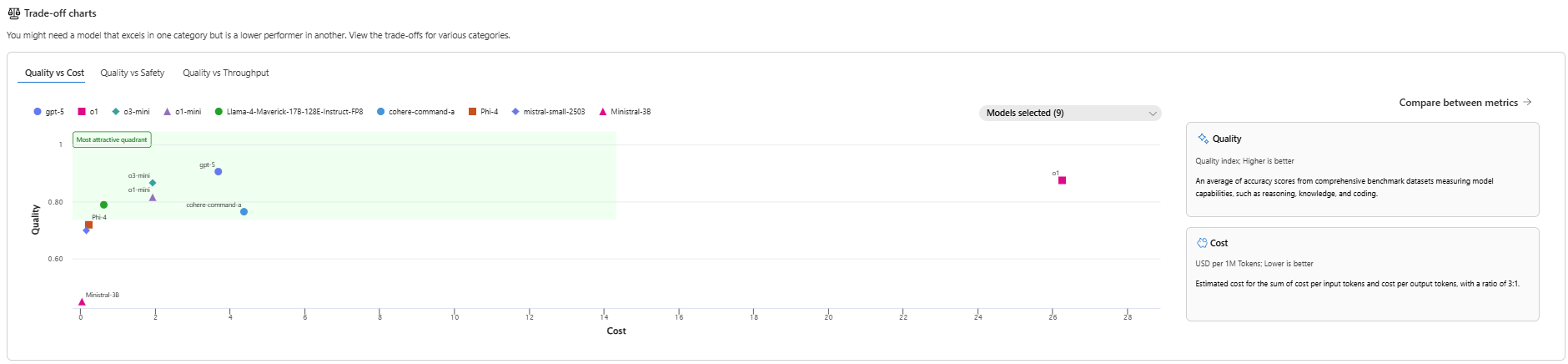
- Trade-off charts to reveal sweet spots between Quality, Safety, and Cost
- Per-scenario leaderboards to show strengths in reasoning, safety, math, coding, and more
By the end, you’ll know exactly how to choose the right model for your next AI build — especially if you plan on selling it on Almma.AI, where performance and trust translate directly into higher marketplace sales.
1. The Big Picture: Best Models by Overall Performance
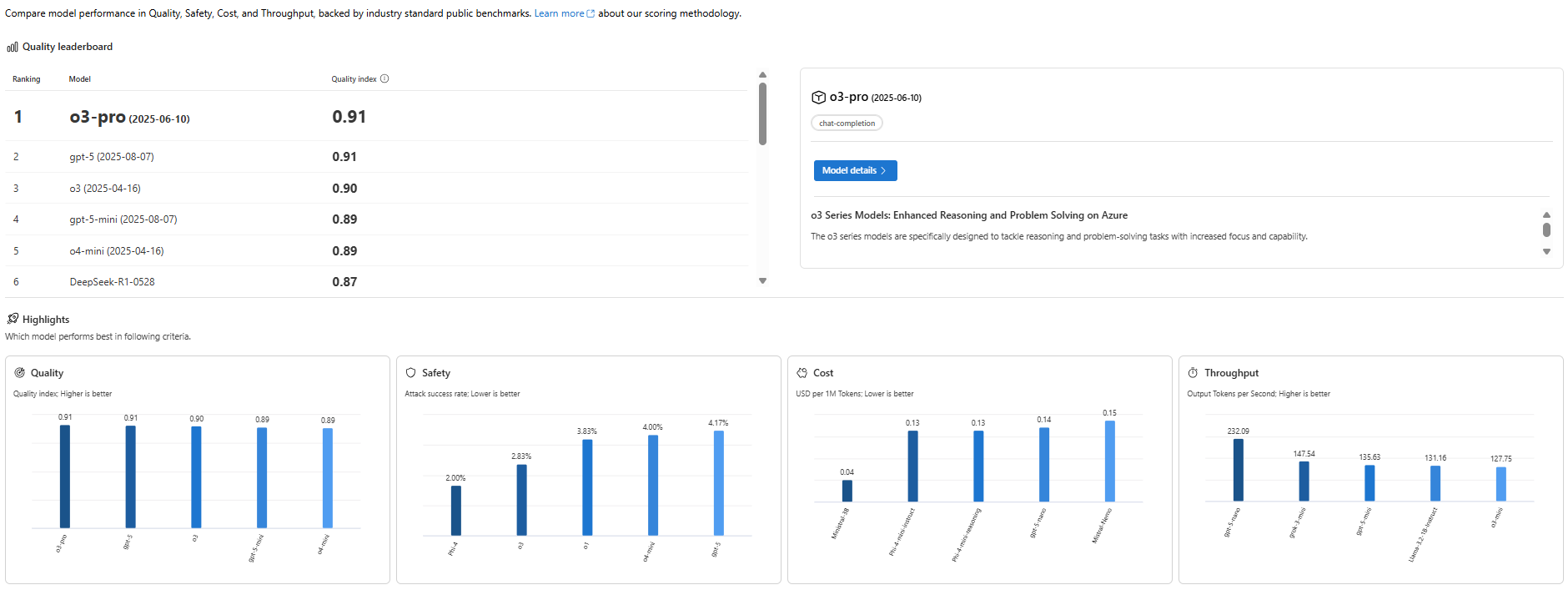
📊 Image: [AlmmaGPT’s best models by comparing performance across various criteria]
Before we get into the weeds, let’s start with the big picture: How do today’s leading LLMs stack up overall in quality?
When AlmmaGPT runs a quality index test, it blends multiple benchmark datasets covering reasoning, knowledge retrieval, math, and coding, creating a single, easy-to-read metric for performance.
The Quality Leaders
Our latest leaderboard shows:
Rank Model Quality Index 1 o3-pro 0.91 2 gpt-5 0.91 3 o3 0.90 4 gpt-5-mini 0.89 5 o4-mini 0.89 6 DeepSeek-R1 0.87 Key takeaway: o3-pro and gpt-5 are essentially tied for the top spot, showing elite capability across the board — though how you prioritize cost and safety may change what’s “best” for your unique use case.
Drilling Down into Core Metrics
- Quality: o3-pro and gpt-5 set the bar with 0.91, followed closely by o3.
- Safety: Here’s where Phi-4 surprises most people — with a near unbeatable 2% attack success rate, it edges ahead of more famous names.
- Cost: Mistral-3B isn’t the most accurate, but at $0.04 per million tokens, it’s absurdly cheap for non-critical tasks.
- Throughput (Speed): gpt-4o-mini is the Formula 1 of LLMs at 232 tokens/sec — perfect for real-time use.
Match Models to Your Priorities
If your priority is:
- Enterprise-grade accuracy: o3-pro or gpt-5
- Maximum safety: Phi-4
- Budget efficiency: Mistral-3B
- Ultra-high responsiveness: gpt-4o-mini
Remember: In an AI marketplace like Almma.AI, your choice impacts user satisfaction and cost of operation, both of which directly affect profitability.
2. Navigating Trade-Offs: Quality vs Cost vs Safety
 📊 Image: [AlmmaGPT Trade-off Charts]
One of the biggest mistakes AI builders make? Picking the most famous or most expensive model and assuming it’s “best.”
The reality: AI is about trade-offs. You might choose:
- A model that’s slightly less accurate but 10x cheaper
- A super-fast model that’s not the safest for sensitive prompts
- A safe, high-quality model that’s slower but perfect for compliance-heavy industries
Our Quality vs Cost trade-off chart puts these decisions into perspective.
The Sweet Spot Quadrant
In AlmmaGPT’s visual, the upper-left quadrant is the most attractive: high quality, low cost.
Here we find:
- o3-mini and o1-mini — Balanced performance with wallet-friendly pricing.
- gpt-5 — More expensive than the minis, but offers cutting-edge accuracy.
High-End Luxury Picks
o1 shines at extreme accuracy (~0.92 quality) but at a huge $26 per million tokens. Great for premium, mission-critical deployments, but overkill for simpler agents.
Budget Workhorses
- Mistral-3B — Bottom line pricing, good enough quality for text generation that doesn’t need deep reasoning.
- Phi-4 — Great combination of affordability and safety, perfect for compliance-heavy sectors on a budget.
Pro Tip for Almma.AI Creators: In a marketplace where your profit margins depend on the balance between operational cost and customer satisfaction, models in the sweet spot quadrant (o3-mini, phi-4, gpt-5) often yield the best lifetime ROI.
3. The Scenario Deep-Dive: Leaderboard by Skill Domain
 📊 Image: [AlmmaGPT Leaderboard by Scenarios]
Overall rankings are great, but the truth is: 🚀 Different models excel in different specialties.
That’s why AlmmaGPT’s Scenario Leaderboards break performance down into specific skill areas — giving you fine-grained insights to match LLM choice with your agent’s purpose.
3.1 Safety-Driven Benchmarks
Safety is measured via attack success rates in prompt injection and misuse scenarios — the lower the number, the safer it is.
- Standard Harmful Behavior: o3-mini, o1-mini, and phi-4 scored a perfect 0%.
- Contextually Harmful Behavior: o3-mini at just 6% is far safer than gpt-4o at 12%.
- Copyright Violations: Nearly all top performers sit at 0% — good news for IP integrity.
When to prioritize: Agents in finance, law, health, education — anywhere trust and regulation matter.
3.2 Reasoning, Knowledge, and Math
- Reasoning: Five models tie at 0.92, including gpt-4o, o3, and o3-pro.
- Math: gpt-4o and gpt-4o-mini lead with 0.98 — perfect for data-heavy applications.
- General Knowledge: gpt-5, gpt-4o, and o3-pro score a strong 0.88.
When to prioritize: Agents for research, diagnostics, analytics, and technical problem-solving.
3.3 Coding Capability
- The top score is modest at 0.77 (gpt-4o), showing code generation is improving, but still a niche challenge.
When to prioritize: Development productivity tools, debugging assistants.
3.4 Content Safety & Truthfulness
- Toxicity Detection: Leaders: o3 and o3-mini with 0.89 — useful for moderation.
- Groundedness: gpt-4o leads at 0.90 — great for factual, evidence-backed outputs.
3.5 Embeddings & Search
These benchmarks test how well LLMs handle semantic similarity, clustering, and retrieval — crucial for AI agents building knowledge bases.
- Information Retrieval: Best is 0.75 — still evolving.
- Summarization: Peaks at 0.32.
When to prioritize: Search bots, knowledge agents, RAG (Retrieval-Augmented Generation) systems.
4. Choosing an AI Marketplace Environment
Deploying an agent publicly, especially on Almma.AI, means thinking like both a builder and a business owner. Here’s why these benchmarks are marketplace gold:
4.1 Customer Experience
Better quality models = happier users = higher repeat usage.
For public-facing agents, gpt-5 or o3-pro could lead to higher marketplace ratings and reviews.
4.2 Operating Costs
Highly accurate models are expensive to run 24/7.
If your agent serves thousands daily, a “sweet spot” model like o3-mini keeps margins healthy.
4.3 Risk Management
Agents that generate unsafe or false outputs risk takedown or negative publicity.
Safety-first models like phi-4 protect your brand and marketplace standing.
4.4 Niche Domination
In Almma.AI’s fast-growing ecosystem, you can win by targeting niche capabilities.
For example:- Financial modeling? gpt-4o-mini for advanced math.
- Research assistant? o3-pro for reasoning depth.
- Education tutor? Safety + knowledge = phi-4 or o3-mini.
5. Recommendations by Use Case
Here’s your quick decision matrix, based on our analysis:
Use Case Type Best Model Why General-purpose assistant gpt-5 Balanced high quality and versatility High-volume chatbot o3-mini Good quality at low cost, safe enough for the public Math-heavy agent gpt-4o-mini Top in math accuracy, high throughput Educational tutor phi-4 Excellent safety record, low cost Document search & RAG o3-pro Strong reasoning + retrieval embedding capabilities Content moderation bot o3 / o3-mini High toxicity detection accuracy Developer co-pilot gpt-4o Leading in coding and general knowledge
6. The Almma.AI Advantage
While you can read about benchmarks anywhere, Almma.AI’s unique edge is that we integrate these live performance analytics into the marketplace itself.
That means:
- Buyers choosing an AI agent can see its underlying model’s strengths.
- Creators can experiment with different LLM backends inside AlmmaGPT before listing.
- The marketplace rewards agents that consistently deliver, which is better for the ecosystem as a whole.
Closing Thoughts
AI model selection is about alignment with your goals, not just picking “the best” model on paper.
If you’re building for profitability on Almma.AI, you need to think like this:
- Use data (like these charts) to weigh quality vs cost vs safety.
- Pick scenario strengths that match your agent’s function.
- Optimize continuously — swap models if usage patterns change.
By grounding your choice in evidence-driven comparisons, you give your AI the best shot at marketplace success — and contribute to a safer, more reliable AI ecosystem for everyone.
💡 Next Step: Ready to build, test, and sell your own AI agent?
Sign up as a creator on Almma.AI, run your ideas through AlmmaGPT’s model selection tools, and list your AI where buyers are actively looking for the next breakthrough.

Your cart (items: 0)
Subtotal
$0.00
Shipping, taxes, and discounts calculated at checkout.
Your cart is currently empty!
You must be logged in to post a comment.