

Bookmarks in AlmmaGPT are a powerful way to keep track of your most important or frequently used content, prompts, agents, and conversations.
Whether you’re a creator, educator, or enterprise user, bookmarks help you stay organized and quickly access what matters most.
In this guide, we’ll walk you through everything you can do with Bookmarks, from creating them to editing, organizing, and managing them effectively.
1. What Are Bookmarks in AlmmaGPT?
Bookmarks are saved references within AlmmaGPT that allow you to:
- Quickly return to specific prompts, tools, or agents
- Organize different ideas or projects into separate categories
- Track and revisit useful experiments, conversations, or research
Think of bookmarks as your personal AI library, a place where you store your most valuable resources for future use.
2. Creating a New Bookmark
To create a new bookmark:
- Go to the Bookmarks section in your dashboard.
- Click the New Bookmark button.
- Enter a Title for easy identification (required field).
- Optionally, add a Description to give more context about what the bookmark contains.
- Click Save to store it.
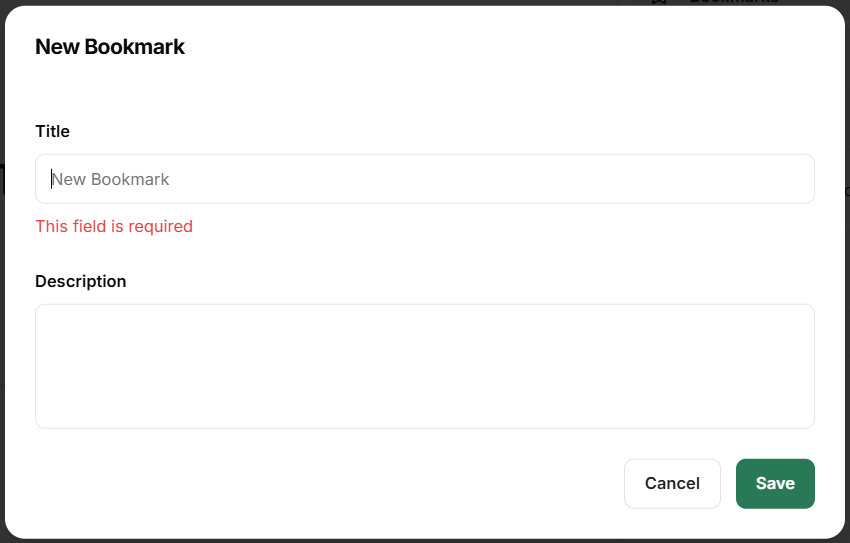
Example: Suppose you attended a virtual workshop on “AI for Marketing Automation” and used AlmmaGPT to generate high-converting ad copy. You could bookmark the chat session with the title “Ad Copy Generator – Marketing Workshop” and add a description like: “Prompt template for Facebook and Instagram ads based on persuasion principles.”
3. Viewing and Managing Your Bookmarks
Once saved, your bookmarks will appear in a list view where you can:
- Search: Use the search bar to filter bookmarks by title
- Track Usage: The column shows how many times you’ve used that bookmark
- Edit: Click the pencil icon to update the title or description
- Delete: Use the trash icon to remove a bookmark you no longer need
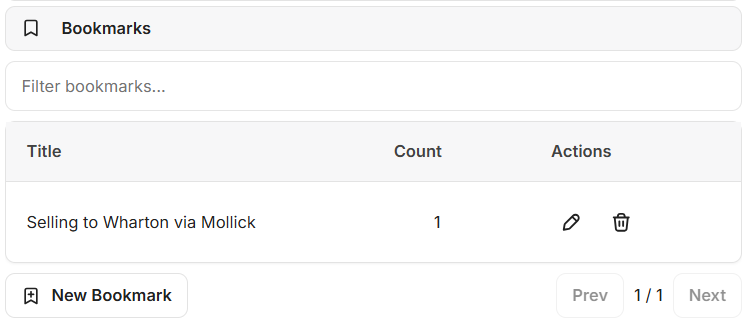
Example: Let’s say you have a bookmark called “Selling to Wharton” that you’ve already referenced once in a conversation.
You could click the edit icon to change the title to “Wharton MBA Sales Pitch” or delete it if it’s no longer relevant.
4. Tips for Using Bookmarks Effectively
- Use Descriptive Titles: Make it easy to identify the purpose of your bookmark at a glance.
- Organize by Project or Theme: Group related prompts and agents together to speed up workflows.
- Leverage Descriptions: Add clear instructions or notes to avoid confusion when you revisit later.
- Monitor Usage Counts: Identify which bookmarks are most valuable — these might be worth turning into shared resources or marketplace listings.
- Regularly Clean Up: Remove unused bookmarks to maintain a tidy workspace.
5. Why Bookmarks Matter in AlmmaGPT
Bookmarks aren’t just about convenience — they help you:
- Work faster by cutting down on search time
- Stay consistent across projects
- Collaborate better, especially when sharing bookmarks within teams
- Keep your best AI ideas and workflows saved for future iterations
✅ Pro Tip: In future updates, AlmmaGPT may offer shared bookmarks for teams and communities, making it even easier to collaborate and build on collective knowledge.
Leave a Reply